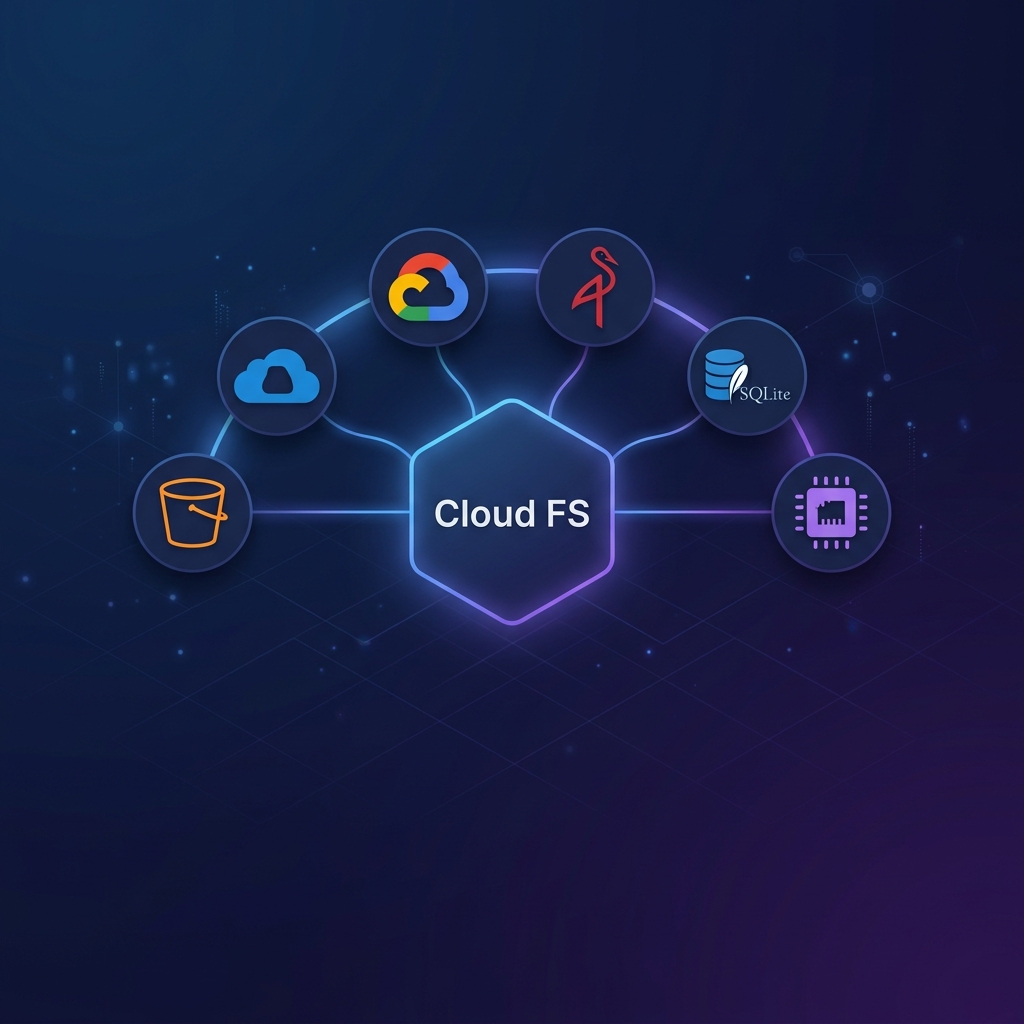
Use Cases & Deployment Models
cloud-fs is designed to be consumed in multiple ways — from a local MCP tool for AI agents to a production enterprise server, an interactive terminal, a drop-in AI skill, or a programmatic SDK. This guide walks through each deployment model with realistic examples.
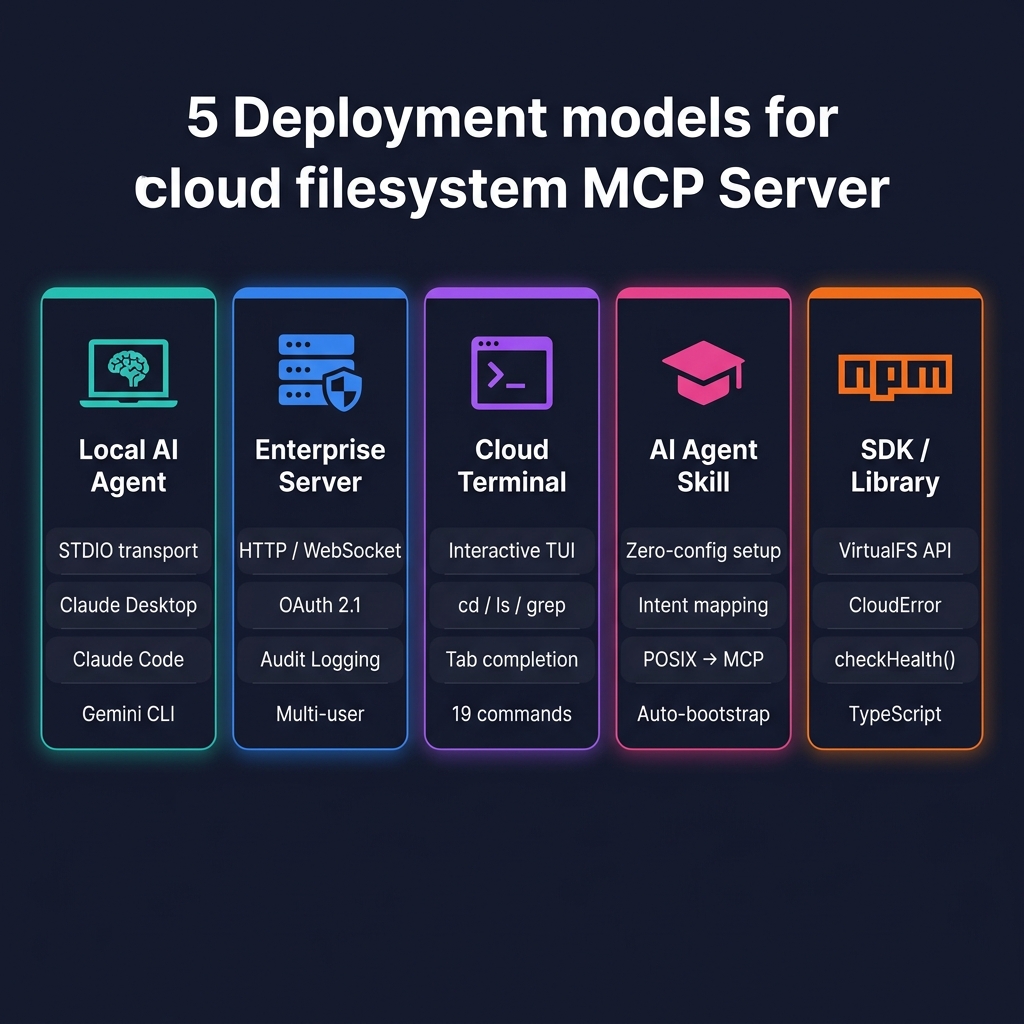
1. Local AI Agent (Claude Desktop, Claude Code, Gemini CLI)
Give your local AI assistant direct read/write access to cloud storage over STDIO — zero network configuration needed.
When to use
- You're a developer who wants Claude or Gemini to manage files in your S3 bucket, Azure container, or GCS bucket during a coding session.
- You want the AI to search, read, edit, and organize cloud files using natural language.
Configuration
Add to .mcp.json in your project root:
{
  "mcpServers": {
    "cloud-fs": {
      "type": "stdio",
      "command": "npx",
      "args": [
        "-y", "@nogoo9/mcp-server-cloud-fs",
        "s3", "s3://my-data-bucket",
        "--enable-shell", "--region", "us-east-1"
      ]
    }
  }
}
Multi-provider in one session
Serve S3 and Azure from a single server instance — the AI can seamlessly copy files between clouds:
{
  "mcpServers": {
    "cloud-fs": {
      "type": "stdio",
      "command": "npx",
      "args": [
        "-y", "@nogoo9/mcp-server-cloud-fs",
        "s3", "s3://data-lake",
        "azure", "az://reports",
        "--enable-shell"
      ],
      "env": {
        "AWS_PROFILE": "prod-readonly",
        "AZURE_STORAGE_CONNECTION_STRING": "DefaultEndpointsProtocol=https;..."
      }
    }
  }
}
Multi-Provider Routing (v0.6.0)
The server automatically routes operations to the correct provider based on the URI scheme (s3:// → S3, az:// → Azure). The AI sees all roots as one unified filesystem.
Key features for this model
| Feature | Why it matters |
|---|---|
| Multi-Provider Routing | Serve S3 + Azure + GCS from one server; AI copies across clouds |
| Startup Health Check | If your AWS token expired, the server fails immediately with a clear error — not midway through a conversation |
| MCP Resources | AI can browse bucket contents as native MCP Resources without tool calls |
| Shell Tool | AI runs jq, grep, wc directly against cloud files |
2. Enterprise MCP Server (Remote HTTP/WebSocket)
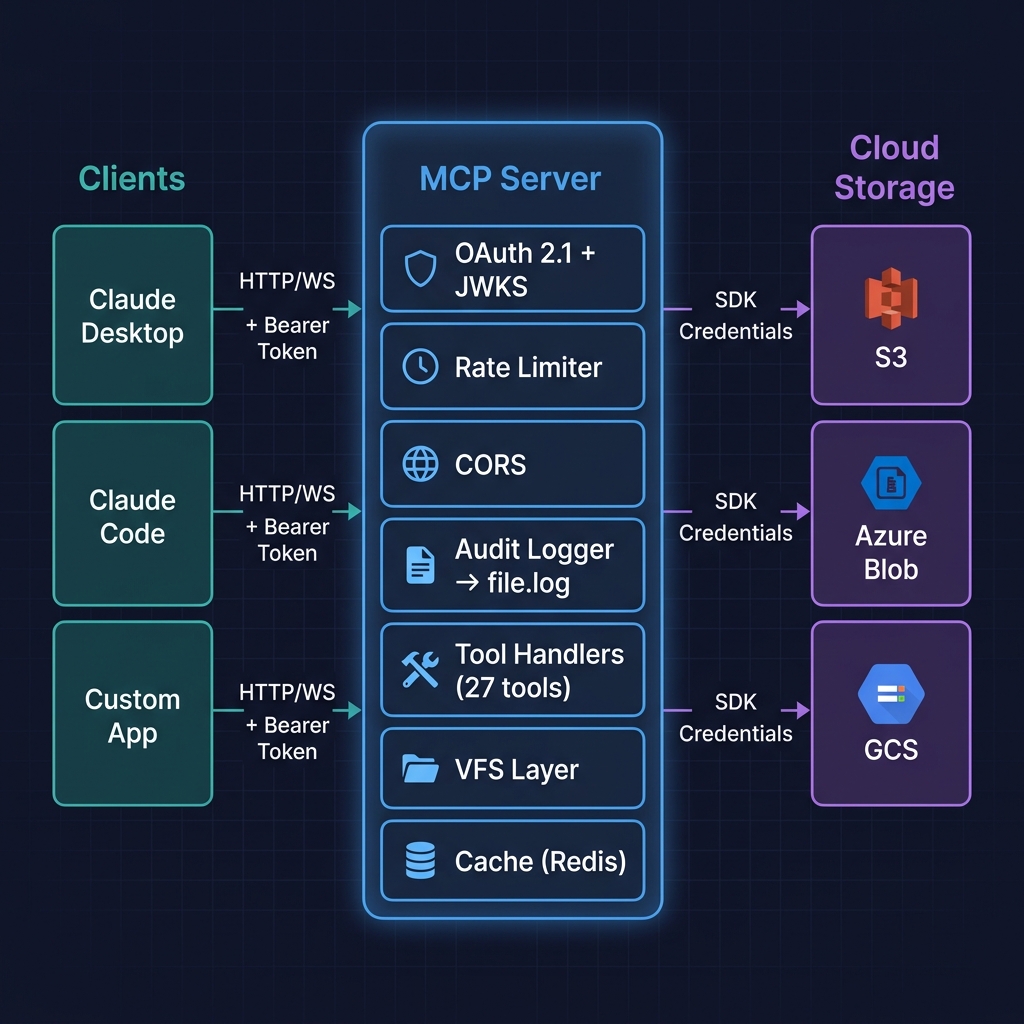
Deploy a centralized, secured MCP server that provides cloud storage access to an entire team of AI agents and applications.
When to use
- Your team needs shared, audited access to cloud storage from multiple AI clients.
- You need OAuth 2.1 authentication, rate limiting, and compliance audit trails.
- You're deploying to Kubernetes, ECS, or Cloud Run with managed identity.
Deployment
cloud-fs-mcp s3 s3://company-data \
  --transport http --port 3000 --host 0.0.0.0 \
  --auth external \
  --auth-jwks-uri https://login.company.com/.well-known/jwks.json \
  --auth-audience https://cloud-fs.company.com \
  --cors-origin https://app.company.com \
  --rate-limit 120 --rate-limit-burst 20 \
  --audit-log-file /var/log/cloud-fs/audit.jsonl \
  --security-headers \
  --request-logging
Client configuration (remote)
{
  "mcpServers": {
    "cloud-fs": {
      "type": "streamable-http",
      "url": "https://cloud-fs.company.com/mcp"
    }
  }
}
Kubernetes with Managed Identity
Deploy to Azure AKS or AWS EKS without hardcoded credentials:
# Azure — uses DefaultAzureCredential automatically
cloud-fs-mcp azure az://company-data \
  --transport http --port 3000 --host 0.0.0.0 \
  --auth external --auth-jwks-uri https://login.company.com/.well-known/jwks.json

# AWS — uses IAM Role for Service Account (IRSA) automatically
cloud-fs-mcp s3 s3://company-data --region us-east-1 \
  --transport http --port 3000 --host 0.0.0.0 \
  --auth external --auth-jwks-uri https://login.company.com/.well-known/jwks.json
Key features for this model
| Feature | Why it matters |
|---|---|
| Audit Logging | Every tool invocation logged with user, tool, latency, and timestamp for compliance |
| Azure Managed Identity / IRSA | No hardcoded secrets — credentials from the cloud platform's identity system |
| OAuth 2.1 Scopes | cloud-fs:read vs cloud-fs:delete for least-privilege enforcement |
| Rate Limiting | Protects against runaway AI loops or abuse |
| Health Endpoints | /healthz and /readyz for Kubernetes probes |
3. Interactive Cloud Terminal (cloud-fs CLI)
A human-friendly TUI for exploring cloud storage like a local hard drive — no MCP client needed.
When to use
- You want to quickly browse, search, or inspect files in a cloud bucket from your terminal.
- You need to generate presigned URLs, check object metadata, or restore file versions interactively.
Launch
# S3 bucket
npx -p @nogoo9/mcp-server-cloud-fs cloud-fs s3 s3://my-bucket

# Azure with shell navigation
npx -p @nogoo9/mcp-server-cloud-fs cloud-fs azure az://my-container

# Demo (no credentials needed)
npx -p @nogoo9/mcp-server-cloud-fs cloud-fs memory mem://demo --seed-demo
Example session
cloud-fs [my-bucket]> ls logs/
2026-05-01-app.log    45.2 MB
2026-05-02-app.log    38.7 MB
2026-05-03-app.log    52.1 MB

cloud-fs [my-bucket]> cat logs/2026-05-03-app.log | grep ERROR | wc -l
147

cloud-fs [my-bucket]> stat logs/2026-05-03-app.log
  Size:         52.1 MB
  ContentType:  text/plain
  LastModified: 2026-05-03T23:59:59Z
  ETag:         "a1b2c3d4..."
Key features for this model
| Feature | Why it matters |
|---|---|
| Byte-range reads | Quickly tail a 50 GB log without downloading the whole file |
| Presigned URLs | Generate secure, expiring download links from the command line |
| Metadata & Tags | Inspect and modify object metadata and tags without the AWS console |
| Version History | Browse and restore previous versions of objects |
| Pipes & Redirects | cat data.json | jq '.results[] | .name' works as expected |
4. AI Agent Skill (skills/cloud-fs)
Drop-in cloud fluency for CLI-based AI agents. The skill teaches the LLM how to use the MCP tools — it provides intent mapping, not just tool access.
When to use
- You've installed the MCP server but want the AI to be expert at using it — not just aware of the tools.
- You want zero-config: the skill auto-bootstraps if the server isn't configured yet.
Installation
# Claude Code
claude mcp add-skill nogoo9/mcp-server-cloud-fs

# Gemini CLI
npx skills add nogoo9/mcp-server-cloud-fs
What the skill adds beyond raw MCP tools
| Without Skill | With Skill |
|---|---|
| AI sees 27 generic tool names | AI knows read_file_range is better for large files |
| AI doesn't know which provider flags to use | Skill guides first-time setup for AWS/Azure/GCS |
AI may call read_file on a 500 MB log | Skill maps "show me the last 50 lines" → read_file_range |
No .mcp.json generation | Skill offers to persist the config for future sessions |
Key features for this model
| Feature | Why it matters |
|---|---|
| Zero-config bootstrap | If MCP server isn't configured, the skill walks you through setup |
| Intent mapping | "Show me what's in the bucket" → list_directory, not read_file |
| POSIX-to-MCP translation | grep → grep_files, find → search_files, cp → copy_file |
| Provider credential reference | Built-in guidance for AWS IAM, Azure MI, GCS service accounts |
5. Programmatic SDK (npm Library)
Embed the VFS layer, cloud tools, or the full MCP server into your own Node.js/Bun applications.
When to use
- You're building a custom application that needs cloud-native file operations with caching.
- You want to embed an MCP server inside your own HTTP server or framework.
- You need structured error handling for cloud operations in your backend.
Installation
npm install @nogoo9/mcp-server-cloud-fsBasic usage
import {
  createMcpServer, VirtualFS, MemoryStore,
  S3Provider, parseUri, checkHealth, formatHealthReport,
} from "@nogoo9/mcp-server-cloud-fs";

// 1. Validate credentials before starting
const roots = [parseUri("s3://my-bucket")];
const provider = new S3Provider({ region: "us-east-1" });
const report = await checkHealth(provider, roots);

if (!report.healthy) {
  console.error(formatHealthReport(report));
  process.exit(1);
}

// 2. Create VFS with caching
const cache = new MemoryStore(provider, { ttlMs: 60_000 });
const vfs = new VirtualFS(provider, cache);
await vfs.hydrate();

// 3. Create MCP server
const server = createMcpServer({ vfs, roots });
Structured error handling
import { CloudError, CloudErrorCode } from "@nogoo9/mcp-server-cloud-fs";

try {
  await vfs.get("s3://my-bucket/missing.txt");
} catch (err) {
  if (err instanceof CloudError) {
    switch (err.code) {
      case CloudErrorCode.NOT_FOUND:
        console.log("File does not exist");
        break;
      case CloudErrorCode.PERMISSION_DENIED:
        console.log("Check your IAM permissions");
        break;
      case CloudErrorCode.RATE_LIMITED:
        console.log(`Retry after ${err.retryAfterMs}ms`);
        break;
    }
  }
}
Multi-provider routing
import { MultiProvider, S3Provider, AzureProvider } from "@nogoo9/mcp-server-cloud-fs";

const multi = new MultiProvider([
  { provider: new S3Provider({ region: "us-east-1" }), schemes: ["s3"] },
  { provider: new AzureProvider(), schemes: ["az"] },
]);

// Routes automatically based on URI scheme
await multi.getObject("s3://bucket/file.txt");  // → S3Provider
await multi.getObject("az://container/file.txt"); // → AzureProvider
Key exports
| Export | Description |
|---|---|
createMcpServer(ctx) | Create a configured MCP server instance |
VirtualFS | FUSE-inspired write-back overlay |
MultiProvider | Composite provider for multi-cloud routing |
CloudError, CloudErrorCode | Structured cloud-aware error handling |
checkHealth, formatHealthReport | Startup credential validation |
AuditLogger, StderrAuditSink, FileAuditSink | Tool invocation audit logging |
S3Provider, AzureProvider, GcsProvider | Storage providers |
MemoryStore, FilesystemStore, createRedisStore | Cache backends |
Cloud-Native Tools Overview
All deployment models have access to the full set of cloud-native tools added in v0.6.0:
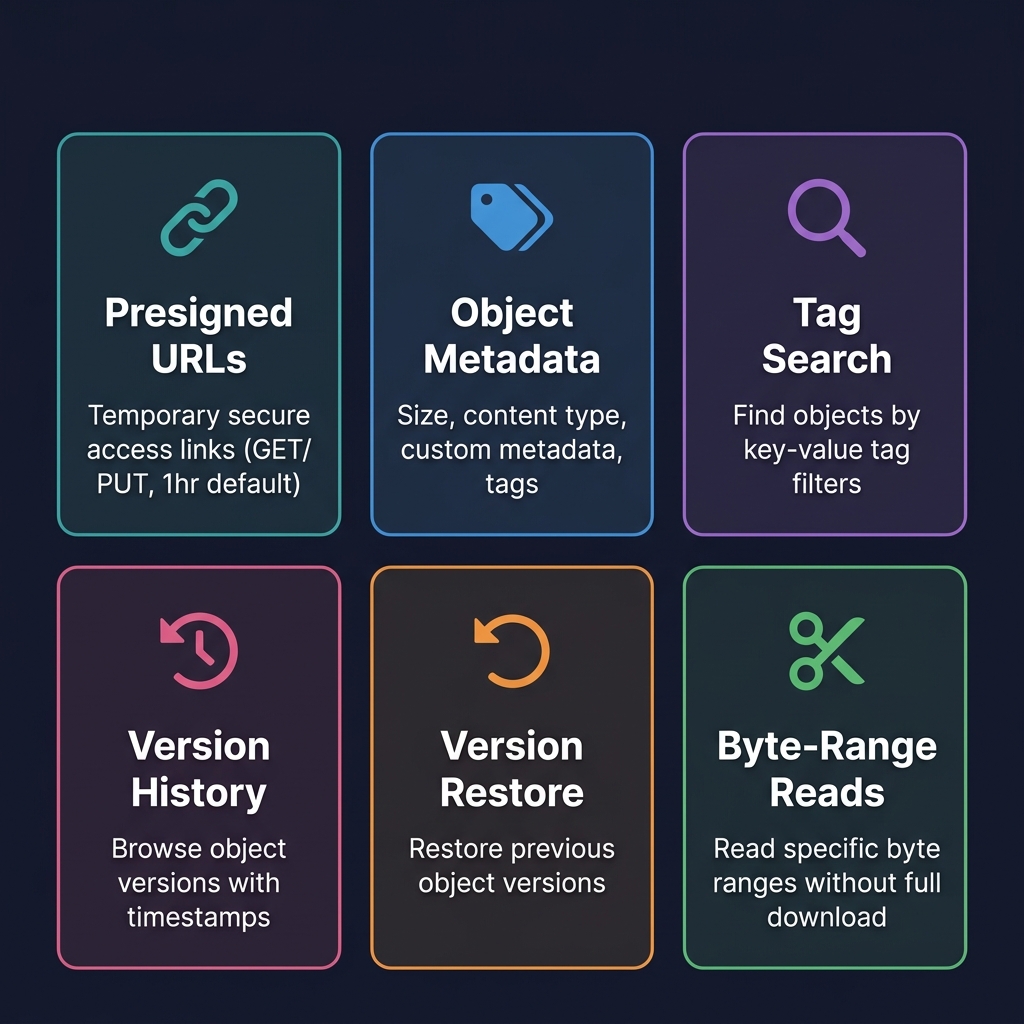
| Tool | Example Use Case |
|---|---|
read_file_chunk | Read bytes 0–1024 of a 10 GB file for header inspection |
get_presigned_url | Generate a 1-hour download link to share with a colleague |
get_object_metadata | Check content type, size, and custom tags before processing |
set_object_tags | Tag processed files with status=reviewed for workflow tracking |
search_by_tag | Find all objects tagged env=production under a path |
list_versions | Browse version history to find the pre-corruption version |
restore_version | Roll back a file to a known-good version |
See the Tool Reference for complete parameter schemas.