Authentication & Authorization
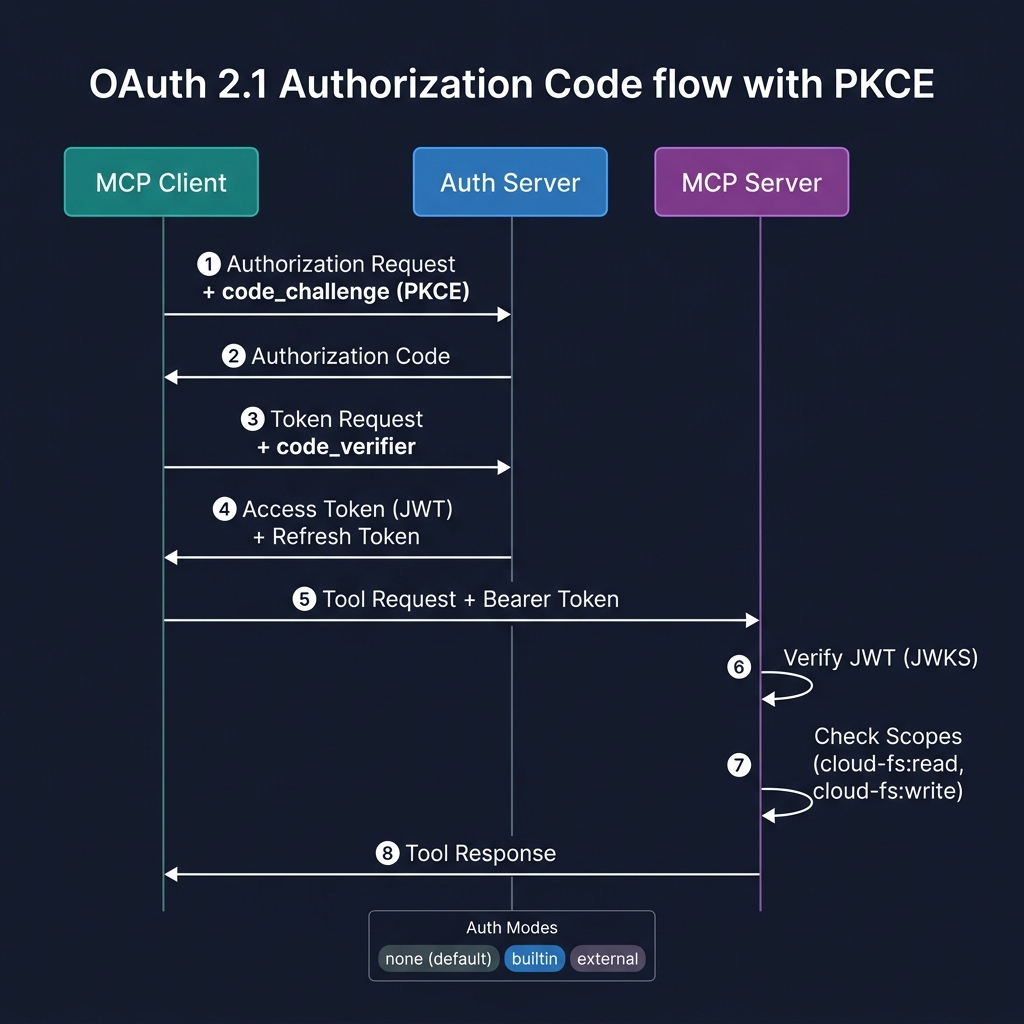
Authentication is disabled by default and only applies to HTTP/WS transports. STDIO mode never requires auth.
Auth Modes
| Mode | Flag | Description |
|---|---|---|
none | --auth none (default) | No authentication. Suitable for local/trusted networks. |
builtin | --auth builtin | Self-hosted OAuth 2.1 Authorization Server. The MCP server acts as both AS and RS. |
external | --auth external | Validate bearer tokens against an external IdP (Okta, Auth0, Keycloak, Azure AD). |
Built-in OAuth Server
The server runs a full OAuth 2.1 Authorization Server using the MCP SDK's mcpAuthRouter():
- Authorization Code + PKCE (mandatory) — interactive user consent flow
- Dynamic Client Registration — MCP clients auto-register on first connect
- Refresh token rotation — single-use refresh tokens prevent replay
- Metadata discovery —
/.well-known/oauth-authorization-server(RFC 8414) and/.well-known/oauth-protected-resource(RFC 9728)
cloud-fs-mcp s3 s3://my-bucket \
  --transport http --port 3000 \
  --auth builtin --auth-issuer https://my-server.example.com
External IdP
The server only validates bearer tokens — it does not issue tokens. Use this when you have an existing identity provider.
- JWKS validation — fetches and caches signing keys from your IdP
- JWT verification — checks signature, issuer, audience, expiry
- Token introspection — fallback for opaque tokens
cloud-fs-mcp s3 s3://my-bucket \
  --transport http --port 3000 \
  --auth external \
  --auth-jwks-uri https://login.example.com/.well-known/jwks.json \
  --auth-audience https://cloud-fs.example.com
ext-auth: Client Credentials (M2M)
Implements the MCP Client Credentials extension for machine-to-machine authentication without user interaction. Designed for CI/CD pipelines, background services, and automated workflows.
- JWT assertion auth (
private_key_jwtper RFC 7523) — recommended - Client secret auth (
client_secret_basic) — simpler but less secure - No user interaction required — tokens granted based on pre-registered client credentials
cloud-fs-mcp s3 s3://my-bucket \
  --transport http --port 3000 \
  --auth builtin --auth-issuer https://my-server.example.com \
  --auth-client-credentials
ext-auth: Enterprise-Managed Authorization (SSO)
Implements the MCP Enterprise-Managed Authorization extension for seamless SSO via your organization's Identity Provider.
How it works
- User logs in to the MCP Client via the enterprise IdP (OpenID Connect or SAML)
- Client exchanges the ID Token for an Identity Assertion JWT Authorization Grant (ID-JAG) via Token Exchange (RFC 8693)
- Client presents the ID-JAG to this server's Authorization Server (RFC 7523)
- Server validates the ID-JAG and issues an access token
Benefits
- Zero manual authorization per MCP Server — SSO handles everything
- Enterprise admins control which users/groups can access which MCP servers
- Granular scope enforcement via IdP policies
cloud-fs-mcp s3 s3://my-bucket \
  --transport http --port 3000 \
  --auth builtin --auth-issuer https://my-server.example.com \
  --auth-enterprise-idp https://acme.okta.com
OAuth Scopes
When auth is enabled, tool access is controlled by granular scopes:
| Scope | Tools |
|---|---|
cloud-fs:read | read_file, read_text_file, read_media_file, read_multiple_files, read_file_range |
cloud-fs:write | write_file, edit_file, create_directory |
cloud-fs:delete | delete_file |
cloud-fs:search | search_files, grep_file, grep_files, list_directory, list_directory_with_sizes, directory_tree |
cloud-fs:shell | shell |
cloud-fs:admin | All tools + get_file_info, list_allowed_directories |
Tokens with insufficient scopes receive a clear error response indicating which scope is required.